 FollowGrid
 5 min read
If you need a copy of your own Instagram followers, start with Meta's official information export. If you need a spreadsheet of the followers of a profile that your Instagram session can access, a Chrome extension such as FollowGrid offers a more direct CSV workflow. The two methods serve different jobs, and neither gives you unrestricted access to another account's data.
| Your task | Method | What you receive |
|---|---|---|
| Keep an official copy of information from your own account | Instagram's information export | An archive in the format Meta offers, commonly HTML or JSON |
| Work with an accessible profile's follower list in a spreadsheet | FollowGrid for Chrome | The accounts collected during that export, downloadable as CSV, Excel, or JSON |
| Check a handful of followers | Instagram itself | A list to browse; no spreadsheet preparation |
Method 1: Request Your Own Follower Data From Instagram
Meta puts its information download controls in Accounts Center. Menu names can change by app version and region, so follow the information-export controls if your screen uses slightly different wording. Meta explains where its download controls live, and its Instagram Help Center has the current account-specific instructions.
- Sign in to the Instagram account whose information you own or manage. Open Settings, then Accounts Center.
- Open Your information and permissions and choose Export your information or Download your information.
- Create an export for the Instagram profile you want. Choose the option to save the archive to your device.
- If Meta lets you select categories, choose Followers and following. Set the date range to All time if you need the full period available to your account.
- Choose HTML for a file you can read in a browser or JSON for structured processing, where those formats are offered. Submit the request.
- When Meta says the archive is ready, download the ZIP file and inspect the followers file inside it. The folder and file names can vary.

This is an account archive, not necessarily a ready-made CSV. Keep the ZIP untouched, and work from a separate copy if you plan to convert the list for Excel or Google Sheets. The official export is for the account you selected; it does not provide another person's private account archive.
Method 2: Export an Accessible Follower List in Chrome
FollowGrid is a Chrome extension for exporting Followers or Following lists that are available to your signed-in Instagram session. It uses the Instagram session already open in the same browser; you do not type your Instagram password into FollowGrid. Access restrictions still apply.
- Add FollowGrid from the Chrome Web Store.
- Sign in to Instagram in Chrome, then open FollowGrid. If the extension asks you to sign in, finish that step on Instagram before starting the export.
- Enter the intended Instagram username or profile URL. Select Followers—the accounts following that profile—rather than Following.
- Choose the collection limit shown in your version of FollowGrid, then start the export. The selected limit is a maximum to request, not a guarantee that Instagram will return that many accounts.
- Check the task result and download the collected list in the format available to you. Use CSV for a straightforward spreadsheet import.
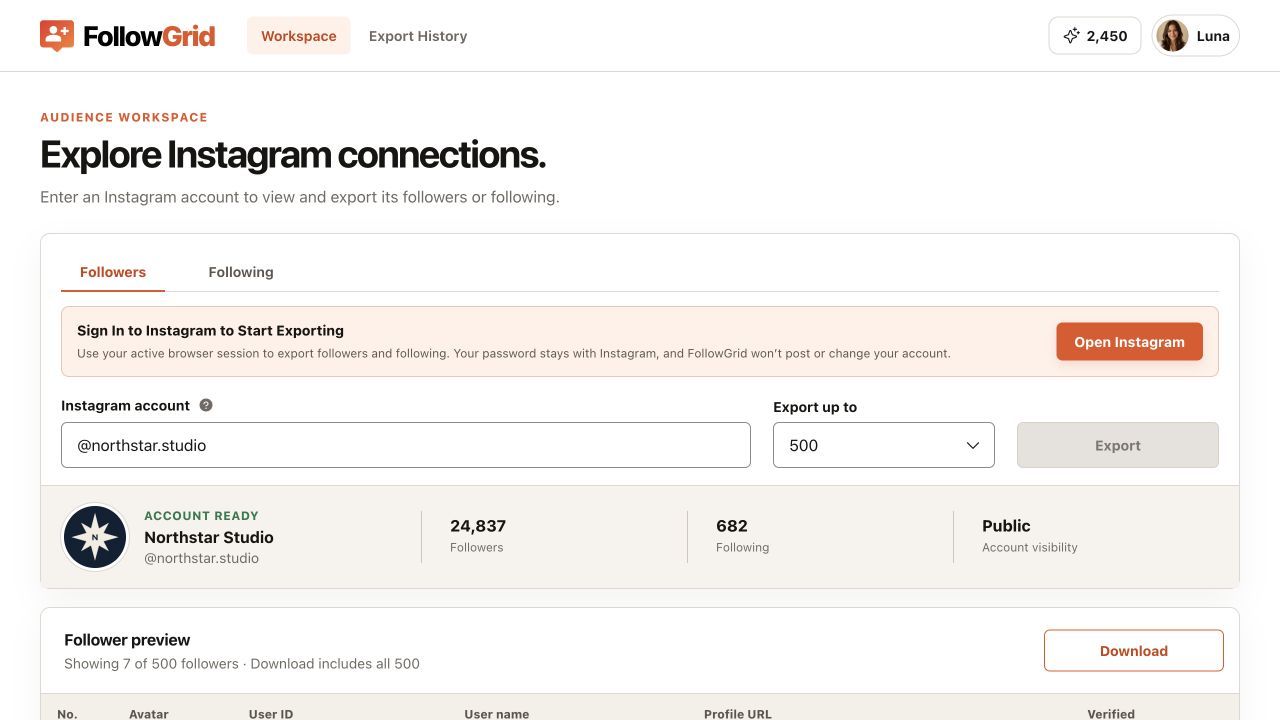
After downloading, keep the original file and record the source profile, the date, and whether the task completed. This makes the list easier to interpret when you return to it later.
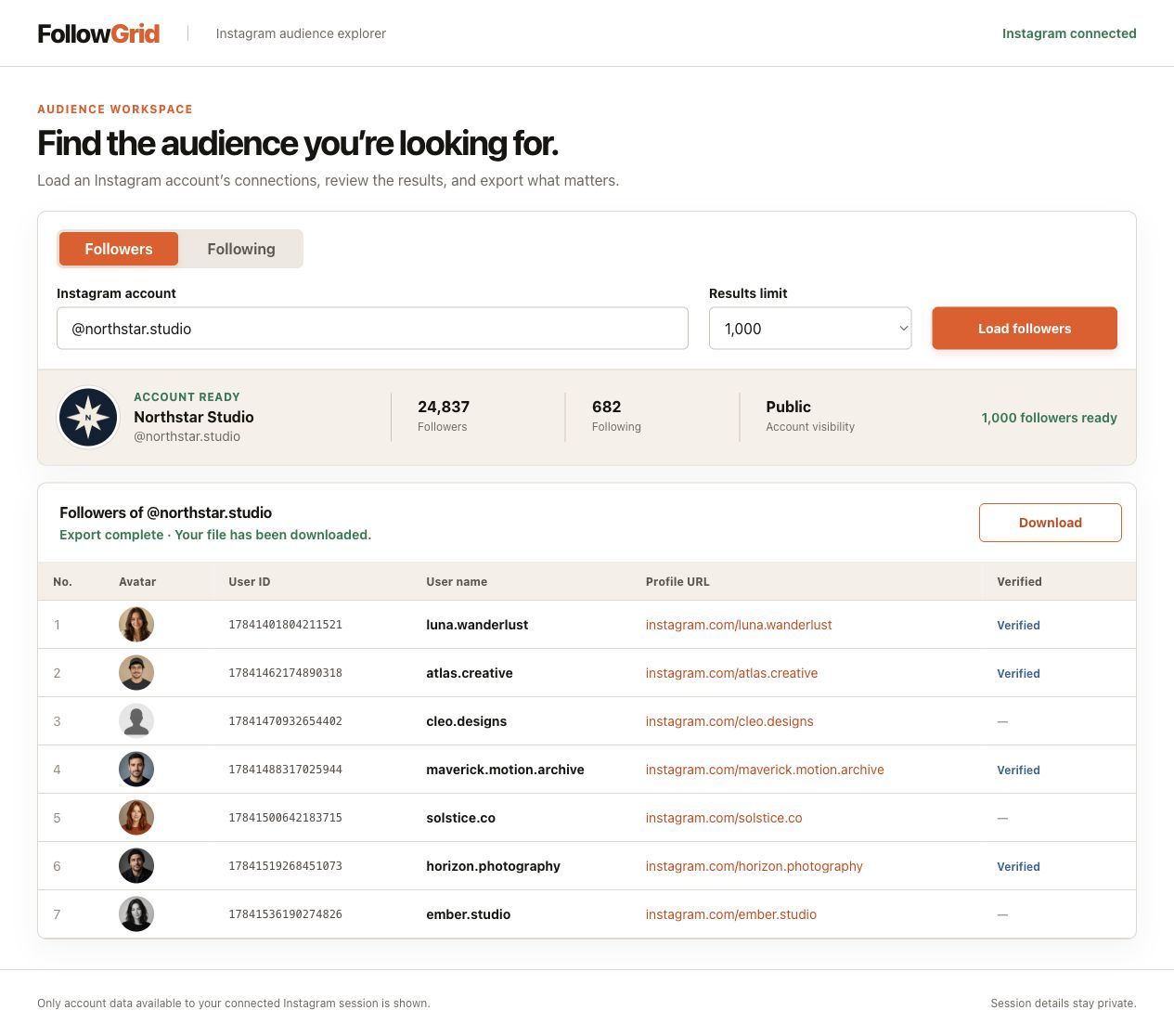
Example result from a local review build, not a live Instagram export. The visible rows illustrate the interface rather than a completeness guarantee.
What the Downloaded List Can Tell You
A FollowGrid export gives you the account rows successfully collected for that task. Its available fields include username, profile URL, user ID, avatar URL, verification status, and row position. Check the file you actually downloaded before relying on a particular column.
The follower number displayed on Instagram and the number of rows in a file answer different questions. A selected collection limit, a stopped task, unavailable accounts, or retrieval conditions can leave fewer rows in the export. A downloaded file alone does not prove that every account behind Instagram's displayed count was collected.

For comparison work, preserve User ID as text when importing CSV into Excel. Excel can alter long numeric identifiers when it treats them as numbers; Microsoft explains how to import them as text. Usernames are useful for human review, but a user ID is the more stable match key when both files contain it.
Which Method Should You Choose?
Choose Meta's export when you need an official archive of your own account information. Choose FollowGrid when you need a spreadsheet-ready list from a profile accessible to your current Instagram browser session. If neither method can access a list, entering a username into an exporter does not remove that restriction.
If your next question is which accounts a profile follows, see the companion guide on exporting an Instagram Following list. Followers and Following point in opposite directions, so confirm the tab before you start.
Frequently Asked Questions
Can I download someone else's Instagram followers?
Meta's official account export is for the account holder. FollowGrid can collect a follower list that is available to your signed-in Instagram session, subject to Instagram's access and retrieval limits. It does not unlock private lists.
Can I download followers without giving FollowGrid my Instagram password?
Yes. FollowGrid uses an existing Instagram session in Chrome, so you sign in on Instagram rather than entering a password into the extension. You still need to be signed in to Instagram for the extension workflow.
Will the file include every follower?
Do not assume so. Compare the requested limit, task result, and unique downloaded rows, and describe the file as the accounts collected during that export.
Is the official Instagram export a CSV file?
The official route provides an account archive in the formats Meta offers, such as HTML or JSON. You may need an extra conversion step to use its follower data as CSV.
Download a Follower List for Your Next Project
If a CSV is what you need, open FollowGrid in the Chrome Web Store, select Followers, and review the collected results before downloading. Keep a dated original so future comparisons have a clear starting point.
 M
MMarshall Sun
Building CommentGrid to decode social conversations. Exploring the signal within the noise of the global social web.